High availability and HTTP load balancing with HAProxy
High availability is essential for web services and online businesses. Visitors to an online store may leave if a page loads slowly, and potential buyers may lose confidence in the service and shop elsewhere. A forced shutdown by a desperate infrastructure administrator can also leave data only partially saved and require backups to restore the service.
This article explains how to use HAProxy to build a highly available, load-balanced environment. It does not cover the complete stack, from application to database; that is a large subject and depends on the technologies used. Instead, it focuses on the architecture and one application for the frontend, an important part of a high-availability (HA) environment that must remain available to clients.
High-availability scenario
The scenario in REF{cenario} is a simple high-availability architecture with three server tiers: firewall, application, and database. A firewall server receives all connections from the internet; a backup firewall can take over automatically if the primary fails. Multiple application servers provide the same service, so the remaining servers can continue if one fails. The same principle applies to the database.
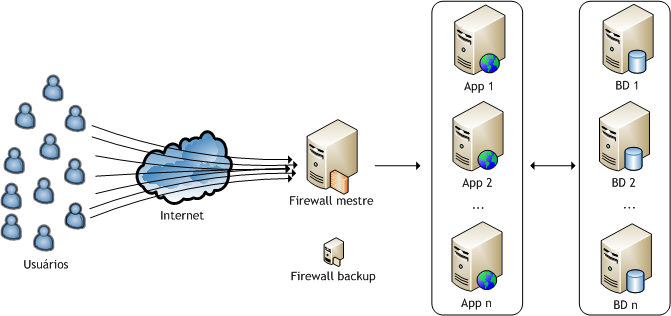
In practice, the whole setup is not that simple. Running an application on multiple servers requires attention to technical details such as sharing cookies and sessions, scheduled jobs, and file maintenance. Maintaining database consistency and redundancy is also difficult. This environment takes more than a developer to maintain; it requires an infrastructure administrator and/or DBA.
As noted above, this article focuses on the frontend of the high-availability environment. In the scenario, the frontend is the firewall server exposed to the internet, through which all user connections enter the HA environment. I plan to cover other HA applications for the frontend, web application, and database in future articles. This article does not explain how to create a backup firewall; that is covered separately.
About HAProxy
HAProxy is a reliable, high-performance load balancer for HTTP and TCP. It receives user connections and acts as a proxy, creating a channel between the user and one of the application servers. Some interesting benchmarks report more than 40,000 connections per second on older hardware with a 10 Gbps network.
HAProxy has several ways to choose which web server receives a user's request. The most useful supported strategies, in my view, are:
Round-robin: select servers in turn, regardless of their current load;
Least connections: select the server with the fewest active connections, making better use of the least busy server;
Cookie: try to keep a user on the same server they connected to initially;
IP hash: choose the server based on the user's IP address.
Only cookie persistence is not itself a HAProxy scheduler; it must be combined with round-robin or least-connections scheduling. Cookies or IP hashing help keep HTTP users' sessions when the scheduler changes application servers. Least-connections scheduling is useful when connections take a long time to close, preventing one server from repeatedly receiving the longest connections by chance.
Test environment
I tested the setup using virtual machines on a quad-core host with 8 GB of RAM. In addition to the HAProxy VM, it ran two VMs for the web application and database and a client VM that repeatedly sent test connections through HAProxy. The setup is shown in REF{testemaquinavirtual}.
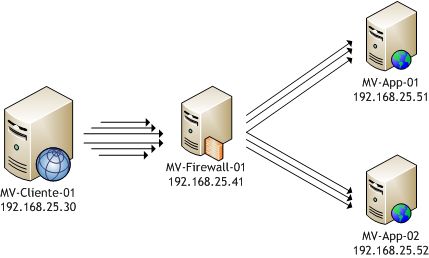
The configuration below uses the IP addresses shown in REF{testemaquinavirtual}. All machines share one network and a gigabit switch. In my test, the virtualization platform's virtual network meant traffic did not reach the switch. Ideally, only the firewall machine connects to the internet, while the others stay in a DMZ. All machines ran Debian 6:
Client VM 01 (IP 192.168.25.30, 2 cores + 1024 GB RAM): runs Apache Bench (from Debian's
apache-utilspackage), which creates multiple connections to one address and generates a basic test report;Firewall VM 01 (IP 192.168.25.41, 2 cores + 1024 GB RAM): runs HAProxy;
App VM 01 (IP 192.168.25.51, 2 cores + 512 GB RAM): hosts the web application served to clients;
App VM 02 (IP 192.168.25.52, 2 cores + 512 GB RAM): the second web-application server.
Configuring HAProxy
You can compile HAProxy from source, available on the HAProxy website. On Debian, installing it with apt-get is easier.
# Primeiro de tudo, entre no modo ROOT, no caso do Debian e demais variações:
su
# Instalando o HAProxy
apt-get install haproxy
Next, edit /etc/haproxy/haproxy.cfg. The original file contains many examples; create a new file and add the configuration below to match the environment in REF{testemaquinavirtual}.
# Nesta seção informamos parâmetros gerais do HAProxy
global
        # Qual o número máximo de conexões?
        maxconn 3000
        # Qual é o usuário que o HAProxy deve usar no Debian?
        user haproxy
        # Qual é o grupo de usuário que o HAProxy deve usar no Debian?
        group haproxy
        # Indicamos que a aplicação deve executar como um daemon
        daemon
        # Quantos processos do HAProxy devem ser executados?
        # Não faz sentido utilizar mais de um com apenas um núcleo de processador
        nbproc 1

# Nesta seção informamos parâmetros para o frontend and backend
defaults
        # Modo HTTP, já que vamos servir páginas por HTTP
        mode http
        # Habilitamos as estatísticas
        stats enable
        # Definimos um usuário e senha para acesso as estatísticas
        stats auth usuario:senha
        # Ocultamos a versão do HAProxy
        stats hide-version
        # Informamos que a página de estatísticas deve recarregar a cada segundo
        stats refresh 1s
        # Indicamos qual a URI vamos acessar para ler as estatísticas
        stats uri /estatisticasdohaproxy
        # Aqui escolhemos o escalonador
        balance roundrobin
        # A opção abaixo força o HTTP 1.0, liberando as conexões mesmo
        # se o servidor servir em HTTP 1.1 com KeepAlive ativo no cliente
        option httpclose
        # Indicamos ao HAProxy encaminhar o IP do usuário ao servidor de aplicação
        option forwardfor
        # Informamos a chamada que deve ser feita no servidor de aplicação
        # para detectar se este está online ou offline
        option httpchk GET / HTTP/1.1\r\nHost:\ localhost
        # Indicamos qual é o tempo máximo de conexão do backend
        timeout connect 3000ms
        # Indicamos qual é o tempo máximo de espera de resposta do backend
        timeout server 50000ms
        # Indicamos qual é o tempo máximo de espera de comunicação do usuário
        # com o frontend (o firewall)
        timeout client 50000ms

# Definimos a porta de entrada de conexões
frontend HA-HTTP
        # Indicamos qual é a porta no firewall para entrada
        # Neste caso é necessário escolher a porta 80, de qualquer interface (*)
        bind *:80
        # Indicamos qual é o número máximo de conexões no frontend
        maxconn 3000
        # Indicamos qual é o backend que deve servir esta porta
        default_backend App-Servers

# Aqui definimos os servidores de backend (de aplicação)
backend App-Servers
        # Associamos ambos os servidores
        # indicando que deve ser utilizado um cookie para persistência
        server App01 192.168.25.51:80 cookie HAP check
        server App02 192.168.25.52:80 cookie HAP check
Save the file and restart the service (still as root):
/etc/init.d/haproxy restartThe environment is ready for testing.
Testing HAProxy
In this environment, visit http://192.168.25.41/haproxyinfo to view HAProxy's status (REF{haproxy}), including connection counts, peak values, traffic volume, and the status of each backend server.
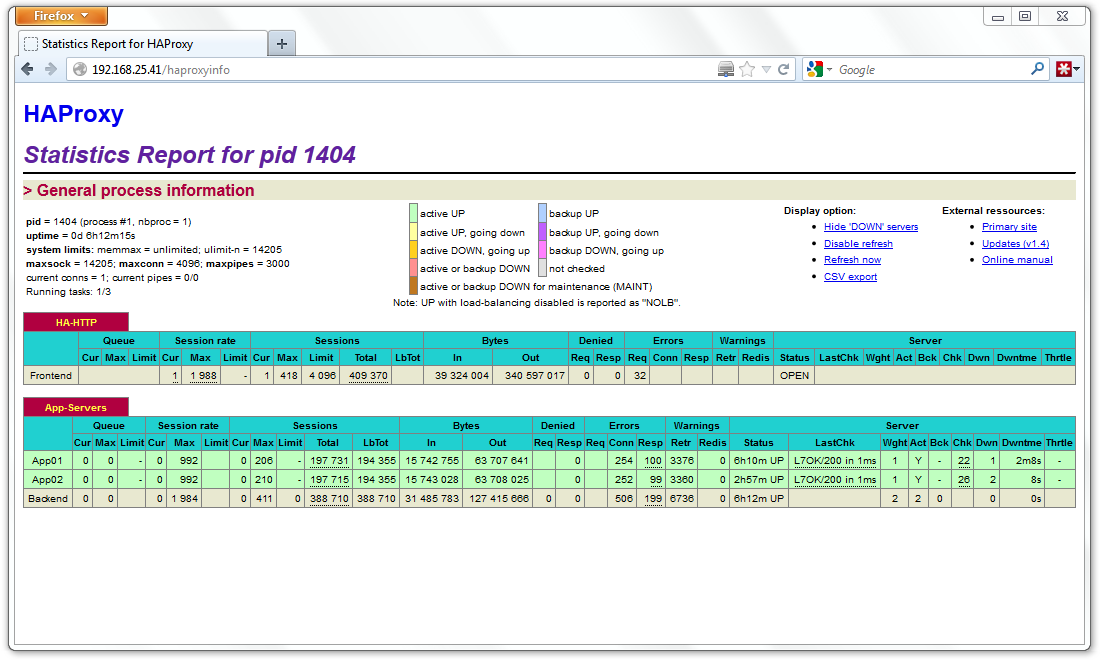
These tests evaluate application behaviour, not performance. Attempts to benchmark it produced similar results because the VMs shared hardware, so the results did not reliably show bottlenecks. I generated load from the client VM with:
# Sintaxe básica do Apache Bench
# ab  -c <numero> -t <numero> URL
# -c <numero> (número de conexões concorrentes)
# -t <numero> (tempo em segundo para teste)
# URL (URL utilizada no teste)
ab -c 10 -t 30 http://192.168.25.41/
ab -c 50 -t 30 http://192.168.25.41/
ab -c 100 -t 30 http://192.168.25.41/
ab -c 300 -t 30 http://192.168.25.41/
ab -c 600 -t 30 http://192.168.25.41/
REF{haproxy-gd} shows monitoring just after shutting down the VM hosting App02 during the 600-concurrent-connection test. A few seconds later, HAProxy marks that backend offline and sends connections only to App01. Performance drops, but the service stays online.
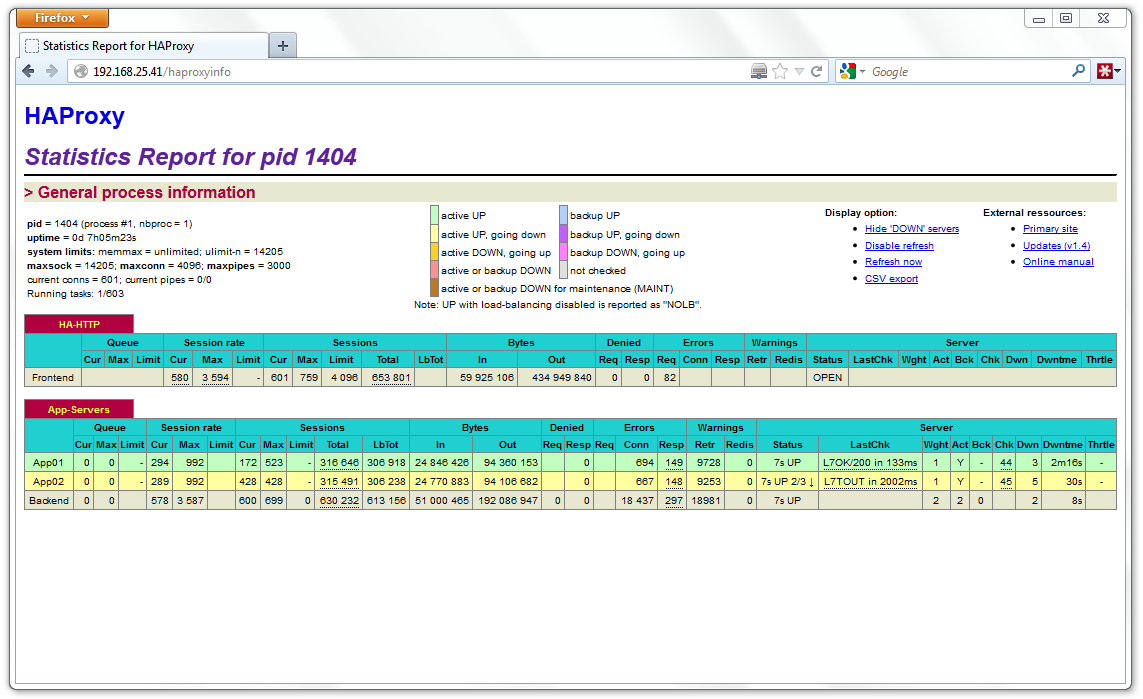
With both servers online, Apache Bench reported up to 3,000 simultaneous connections per second. HAProxy's statistics are not reliable in this configuration: with two processes (nbproc 2), the monitoring page alternates between them instead of showing consolidated results.
If both servers go offline, HAProxy receives connections and keeps them open until a server becomes available. The configured timeout removes accumulated connections. If too many connections accumulate and the timeout is too long, the firewall could also go offline. Other techniques can help with DDoS problems.
Linux also limits the number of simultaneous connections based on the number of file descriptors. If kernel variables are not adjusted, you will not reach a high connection count. Check somaxconn, portrange, tcp_fin_timeout, netdev_max_backlog, file-max, ulimit, and others.
Conclusions
HAProxy is an interesting tool for implementing high availability; load balancing is a consequence. You can configure servers in a master/backup arrangement to get high availability without load balancing. That may not make sense when hardware is always available, but it can be useful when infrastructure is billed by resource consumption (CPU and memory).
I could not reach the environment's CPU or memory limits; virtualization was the bottleneck. For some reason, the VMs could not transfer more than 100 megabits. Page size would certainly affect the results: a larger page occupies the firewall longer and requires more resources to serve simultaneous connections. Using one or two processes made little difference, likely because of the VMs.
The application appeared stable. Client connections were not interrupted; responses were only delayed when a server went offline. HAProxy is not limited to HTTP: it can serve other TCP connections and balance load across applications that use TCP.
Future tests could compare HAProxy with tools such as Pound and Crossroads; reliable results would require separate physical machines. Other high-availability setups use caching applications in the frontend. They are not directly comparable, but can isolate and reduce load on backend servers. I plan to cover one of these applications in a future article.